Advantages of Adopting SAP Business One in Getting Business
Business processes certainly require attention and accuracy so that the business can run smoothly and successfully. To simplify the process, many entrepreneurs often adopt SAP Business One to help each process. So what are the benefits of using this software?
Here are some of the benefits you get if you use SAP Business One in running your business, including:
The advantages of adopting SAP Business One
Some of the benefits that you will get if you use SAP Business One in business processes, namely:
Faster business growth through consolidation of processes and operations
A more efficient business process, because it minimizes data and manual duplication errors.
Relationships between business people are simplified and closer, including relations between suppliers (suppliers), partners, to consumers (customers).
Costs can be cut more effectively
Optimal use of SAP Business One can benefit your business through the profits generated, and can increase your business potential.
Flexibility in using SAP Business One software
You can use SAP Business One software on Microsoft Windows and have a variety of flexibility that can meet all your business development needs, including:
Can be accessed anywhere and with any device
This software is quite flexible and easy to use, because you can access it anytime, anywhere and use any device. Besides being able to run on Microsoft SQL, you can also run it with SAP Hana server too.
Support for business development to overseas
The use of SAP Business One also supports the development of your business, even abroad. This is evidenced by the availability of 27 languages and 43 country-based versions, and was sent and supported locally by more than 700 partners.
Can meet your changing needs
As your business begins to grow, you can adjust and expand the use of SAP Business One to meet the needs of your changing business.
You might decide that you want to implement Disaster Recovery as a Service (DRaaS) in your company, but is there an option for you? But it all depends on your budget, as well as the time you can allocate for "oversight" and "testing".
You who want to be completely free, can choose Managed DRaaS, where everything is done for you. Or Assisted DRaaS - not offered by all providers - where they have experts who will provide assistance only when needed. And if you have internal expertise and bandwidth, DRaaS self-service allows you to create your own strategy.
For more details, let's discuss one by one.
DRaaS Self-Service
DRaaS self-service will be suitable for companies that have qualified internal experts and management capabilities who are ready to plan, deploy, and execute all DRaaS strategies. This approach requires customers to have a thorough understanding of the IT area, applications and services themselves.
Assisted DRaaS
The benefits of Assisted DRaaS are almost the same as the benefits of Manged DRaaS. You can still take advantage of provider expertise, and administrative burdens to manage solutions at a lower cost than traditional DRaaS.
Assisted DRaaS service providers can add value by providing consultation and advice on how to optimize disaster recovery procedures. They often have a team of experts that you can count on when you need help.
Perhaps the most interesting benefit of Assisted DRaaS is that this approach allows customers to identify their DR weaknesses and then pay DRaaS service providers to deal specifically with those services.
Managed DRaaS
With Managed DRaaS, a company can free itself from almost all of its DR responsibilities to outsiders. The burden of protecting infrastructure resources, including cloud and on-premise, as well as DR testing, validation and operations, will shift from customers to service providers.
Managed DRaaS providers can offer "platform-agnostic technology" that provides failover for physical or virtual hardware in customer datacenter on-premise or in various cloud providers
All DR actually have the same goal, because people never know exactly when a disaster will strike. However, when you are required to choose a DR service, it is important to consider the needs and capabilities of your business, because there is no solution that has one measure for all needs.
SAP Single Sign On is a security product from SAP that allows users to have secure access to SAP and non-SAP applications with a single password. This is intended to increase company security and efficiency by providing access to applications on all systems.
According to SAP, SAP Single Sign On provides benefits in security, reducing costs and IT efficiency. Which will strengthen corporate security by using advanced authentication and encryption technology, and all passwords are stored in one centralized and protected storage area. Costs can be reduced by limiting the number of password-related calls that have to be handled by help desks, and by minimizing manual authentication and password resetting. IT efficiency can be improved because there is no need to provide, protect, or reset passwords or manage password policies on various systems.
According to the vendor, SAP Single Sign On works for SAP and non-SAP applications. It was developed by Secude, SAP's technology partner, and was acquired by SAP in 2011. It is based on standard security technologies, including Kerberos, X.509 digital certificates, and SAML (Security Assertion Markup Language).
The security features of Single Sign On SAP include:
Integration by implementing existing public key infrastructure (PKI), allows the use of a single PKI if the company already has a previous one;
Automatic certificate availability cycle management for SAP NetWeaver Application Server for ABAP, which can reduce manual certificate renewal efforts, prevent downtime and limit human errors in certificate renewal;
Secure Login Server that allows several ways to provision X.509 certificates for mobile devices;
An encryption-only mode that allows network encryption for SNC protocols that communicate with other SAP systems even when a user's specific security token is not available or has not been configured;
Secure Client Web Login allows business processes to run via the browser, either on prem or in the cloud; and
Supports "Perfect Forward Secrecy" for SNC Communication, which reduces the risk of "compromised keys" that hackers normally use to decrypt data from previously recorded sessions.
SAP Single Sign On is available under license and can be downloaded from the SAP Support Portal.
The spread of the COVID-19 pandemic in all parts of the world is currently forcing everyone to keep their distance to prevent the virus from being transmitted massively. Besides the many victims who died as a result of COVID-19, the other domino effect of the COVID-19 pandemic is the increasingly sluggish economy and business, mass layoffs occur in all parts of the world, millions of people lost their jobs due to COVID-19. Some companies have also implemented work-at-home policies to anticipate the spread of COVID-19.
Then related to the work of internal auditors, how do you respond to this work from home activity? can it be applied? How effective and efficient is it even if it can be applied?
Answering these questions certainly requires a comprehensive understanding of the duties and functions and positions of the internal auditor.
The first relates to internal auditors, internal auditors are auditors under management whose job is to conduct an operational audit of the company, so that the company's operations run according to rules, procedures and are achieved effectively and efficiently, the results of the internal auditor's audit results are used by top management to determine the right decision for the company.
In the condition of work form home, some internal auditor works like this can be done remotely, including examining procedures at the company or other examinations that are administrative in nature, where the auditor will focus on the evidence in the form of documents , because with the current development internal auditors can ask for physical evidence which is then digitized in the form of softcopy files.
Unlike the work of auditors who have to apply physical inspection procedures for goods, for example, stock taking of goods, then also evaluation of services, so for the time being working remotely is still not appropriate.
Then talk about effectiveness, in the process of working long distances the auditor only checks and evaluates evidence in the form of softcopy submitted by the auditee, which is considered to be so ineffective, why is that? because with the growing development of the field of information technology at this time it is not impossible that documents in the form of softcopy can be manipulated or engineered by the auditee.
For efficiency, of course, if the long-distance internal audit service is more efficient, you can imagine how much money can be cut by conducting a remote audit. The cost reduction includes the costs of official travel, such as transportation costs, examination allowances, and then the cost of meals.
From some of the things described above with consideration of the conditions in the midst of the pandemic COVID-19, the option to conduct long-distance internal audits can certainly be considered by management, but of course to maintain the quality of the services of the linternal auditor must also really carry out additional procedures that would need to be applied to the remote audit process.
Management Control System and its Relationship with Internal ControlManagement Control System or MCS is a collection of tools used in organizations and implemented in a coordinated manner (Efferin and Soeherman, 2010). MCS itself consists of 3 important parts namely:
Management
Control
System
Management
Management according to The Liang Gie is an element which is a series of acts of moving employees and directing all work facilities so that the objectives of the organization concerned are actually achieved, Management has 3 basic functions namely:
Planning
At the planning stage, managers have the task to formulate plans for the company both financially and operationally planning.
Actuating
Actuating is the stage where all resources (human) endeavor to realize the plan by carrying out the tasks that have been given previously.
Controlling
Control is the process of ensuring that all activities carried out are in accordance with established plans and when deviations occur can be immediately addressed.
Control
Activity monitor to ensure an activity goes according to plan.
System
System is a series of processes of elements that work together to achieve a goal.
The system can be divided into two namely: Artificial & Natural
Elements in MCS :
In its implementation, MCS is closely related to humans. Human performance is one of the determinants of MCS success in the structural world. As for some of the main problems that occur to humans in carrying out their duties, namely:
Lack of Direction : Staff do not understand the direction / goals / goals of the company
Lack of Motivation à Staff lack the incentive to do their jobs
Personal Limitation à Limitations of expertise
Internal Control is a process designed to achieve internal goals
Effectiveness and efficiency of operations
Reliable financial reporting
Compliance with laws and applicable regulations
Components in Internal Control:
Control environment
Risk control
Control activities
Information and communication
The relationship between internal control and MCS occurs when there is interaction between humans and the work given. This is very closely related to the Fraud triangle:
Fraud is a fraudulent act aimed at obtaining profits for the individual. To avoid any cheating that might occur, therefore an internal control is needed that can be manifested in the Management Control System.
The following are tips for you to pass the exam during SAP certification, based on the experience of colleagues who have passed the SAP certification exam.
Study study study. Good preparation is to take SAP courses. this will make you far more effective in preparing for the SAP certification exam. SAP has many educational partners for you in preparing for the SAP certification exam.
Collect as much information as possible about the SAP certification exam from the SAP training website, namely: Example questions., Frequently discussed topic., number of questions and time allowed.
Never spend money on websites that claim to provide certification exam questions. Most problems are not useful and more often have expired. Appreciate yourself. As a prospective SAP consultant, you must really struggle to pass the exam.
Know what you will face in the place of the exam. Usually the exam is held at a third party's place, there may be someone besides you who is taking the Microsoft certification exam. Some are mostly held on weekends. You might be asked to give up everything you have to keep in a locker. You will be given a pen and paper, but when it is finished you will return the paper. Imagine you are under strict supervision.
Carefully examine each question. Does the question need one or more answers? This can be seen from the text but also from the radio button or check box. The exam application will warn you to fill out each answer 0 but not warn you if you answer less or more. If a question requires 2 answers but you answer only one (even if it's true) you still get point 0.
The exam application will allow you to 'bookmark' questions. Use this feature to signify questions that are 100% you are not sure of the answer. When you return to answer you might not remember to answer. But you must focus on every question, make sure all questions are answered.
The exam application does not tell you how far your exam questions are (eg questions 57 of 80). Use your stationery to record how many questions there are in each section so you know exactly what page it is on.
After the test you will receive the results immediately, Congratulations! If you follow these tips, it's likely that you will pass the certification exam. Good news for you to add to your value. You can add SAP certificates to your CV column.
About Cash flow and its effects for manufacturing companies. When we discuss a business entity, whether it is a service business, trading, or manufacturing, surely we will not be able to let go of one important aspect in it. The important aspects are: finance. Can be cash, cash equivalents, or other assets. What is clear, finance plays an important role in running a company's business.
And one important aspect of finance is cash flow.
What is cash flow and how does it affect a manufacturing company? This paper will try to answer it. The hope is also, by understanding this, you will be better able to maximize cash flow turnover to further advance your company.
So, let's start by discussing what cash flow is.
About Cash flow: Definition
Literally, the notion of cash flow is actually very simple.
the total amount of money being transferred into and out of a business, especially as affecting liquidity.
Yes, literally, cash flow is just:
the total value of money that moves in and out of the business, mainly liquid or fixed.
So, in a nutshell, cash flow involves all our buying and selling transactions to third parties. What is an example of liquid assets? We can say money or cash and cash equivalents (like money in a BANK, etc.). There is also a stock of goods whose value has been locked from HPP or from the acquisition price (without depreciation). And some other examples.
So, for example we buy goods, that's when cash flow occurs. Our money decreases and our supply increases. Likewise, when we sell goods. Money increases and inventories decrease. And remember, what counts as affecting cash flow is when money has changed hands. Debts and Receivables that are still classified as AP (Account Payable) and AR (Account Receivable) should not be considered as cash flow.
The next question is, why should not it be considered? The second discussion will try to answer it.
About Cash flow: Its influence on company business processes.
I can say, cash flow is a real target that companies should pursue. Often companies are more concerned with turnover (minded turnover) and it can be fatal for business. About the dangers of minded turnover, I will discuss in another article, so that it is more complete.
Now, back to cash flow, when discussing the company's business processes, it is only natural for companies to be more concerned with profit (income statement) than turnover. Because, after all profit is actually distributed when dividends. Not turnover. 🙂
But, one thing that must be considered by a company's accounting and finance department is, not just profit, but profit that has an effect on cash flow.
Why?
Because of the large profits, the company doesn't necessarily have a lot of money
Conversely, small profits, with the right cash flow management, can make companies still have a lot of money and can be rotated for various things.
Okay, maybe still a little confused. I will try to explain in a few brief illustrations.
For example, we have a high profit. Say 10 billion in one year. The question is, does the 10 billion actually exist in the company? Don't tell me, out of the 10 billion profit, 9 billion of them are receivables, which apparently aren't liquid from consumers? As a result, even though the company reported a profit of 10 billion, still money coming into the company, not up to 1 billion. It's hard to pay taxes.
On the contrary, the company reportedly only made 1 billion in one year. But thanks to bargains that are good at purchasing, the company has 9 billion in debt that does not need to be paid for the next 30 days. With the right sales projection, the company has physical money that can be used for a variety of other needs that could be profitable for the company, such as: buying raw materials in the form of cash which results in lower prices. Daily deposits that result in cash breeds also become one of the other benefits.
That is why, cash flow is more important than profit, profit is more important than turnover. But clearly, the company also still needs large profits so that cash flow can run smoothly. If the company has 9 billion in debt but does not have a profit projection to pay the debt, then it will be the same at the end.
Well there are a number of ways in which you can definitely make millions in your career at SAP. SAP (Systems, Applications, Products in Data Processing) is a niche area and today skills are very much in demand. Thanks to technology now you certainly can become a millionaire in not much time. Let's get to know these tips and tricks!
1. Concentrate on learning not on Money: We all agree that nobody works for charity. But the fact that learning will take it back is far better and leads to a higher level than focusing only on the financial aspect.
2. Don't choose modules because of high demand in SAP: Although there are a number of modules offered by SAP for all clients and employees, you must be selective in your approach and choose the skills that you feel will best suit you and not because modules are high in demand.
3. Good to have relevant business experience: Working on SAP modules or applications where you have the right business experience will always help you move faster and learn better from your peers. You will be able to relate to things better and work more efficiently.
4. Certified in SAP: it's always better to get professional certification because only then then companies prefer to hire you and chances are you get a higher salary too.
5. Learn and master a certain stage: A rolling stone collects no moss, and that is true with respect to SAP too. It is always better to master certain phases than to learn all stages of the project.
6. Flexibility is key: You can't be rigid with respect to the timings of your work. Most of us today work in a global environment and must be aware of the fact that people work all the time. There are project deadlines that must be met, regardless of the time zone we work in.
7. Time is very valuable: You should avoid spending too much time on social media, conferences. You prefer to spend time on the SAP community network and be able to learn about various SAP modules.
8. Knowledge is a weapon: Always remember knowledge is a weapon no one can take from you or steal from you. You know the better your chance to move up the ladder and grow financially too.
9. Never say no to Travel: if your colleague or your boss wants you to travel for work related purposes you must always agree and never refuse.
10. Other advice's about knowledge and schedule: let your colleagues and friends about your schedule and your knowledge of SAP, which will allow them to allocate work to their SAP projects according to you.
Like careers or other fields SAP also requires a lot of dedication, passion and hard work. If you follow the above principles in any field, you will surely succeed.
The LIFO, FIFO, FEFO, and Average Cost - Inventory methods represent the majority of trading business assets. Thus, inventory is a very important component in a company's balance sheet. This is why it is important for trade business owners or managers to know the value of their inventory.
There are four ways that are generally used by retail and wholesale business owners to manage sales and find out the value of their inventory items, namely the LIFO, FIFO, FEFO, and Average Cost methods. How do each of these methods work and what distinguishes the four? The following is a detailed explanation.
FIFO method
Differences in the LIFO, FIFO, FEFO, and Average Cost Methods In the FIFO (First In, First Out)method, items that are first entered will be sold or issued first, while items that last entered will be sold or issued later on. This method is the most common method used in inventory valuation.
The FIFO method is based on the assumption that the flow of inventory entry costs must be matched with the sales proceeds. As a result, the cost per unit of inventory entered last is used as a basis for determining the cost of goods still in inventory at the end of the period (ending inventory).
For example, a bakery produces 200 buns on Monday at a unit price of $. 10,000, and 200 more breads on Tuesday at a unit price of $. 15,000. FIFO states that if the bakery sells 200 loaves on Wednesday, the COGS (on the income statement) is $. 10,000 per bread, because this is the unit price of the first bread in inventory. Bread whose unit price is $. 15,000 will be allocated to end inventory (on the balance sheet).
Metode LIFO
The LIFO (Last In, First Out) method is a method that is inversely proportional to the FIFO method. According to this method, the last item entered will be issued or sold first, while the goods that first enter the warehouse will actually be removed or sold later on. This method aims to facilitate the process of structuring the goods, both inputting and taking inventory.
LIFO method allows companies to be able to save taxes when inflation occurs, due to small profits. In addition, operating income in the company will not affect the profit or loss of price fluctuations that occur. However, the use of this method is more complicated than other methods and the bookkeeping costs are more expensive and the resulting profit / loss is lower.
The LIFO method is no longer recognized by international accounting standards. Likewise by accounting standards applied in Indonesia. PSAK, which is a reference for Indonesian accountants in accounting, has adjusted to IFRS that is used globally.
There are three reasons why the LIFO method is ineffective to be used in valuing inventories, firstly because there is a significant difference in earnings. Compared to the FIFO and FEFO methods, the LIFO method, there is a considerable difference in the operating profit generated when using the LIFO method in estimating inventory.
Second, the LIFO method also does not represent the current level of inventory costs. This makes the value of inventory has no relevant value or the actual state. In the end this reduces the quality of the financial statements themselves. Finally, this method can also be used to manipulate taxes.
FEFO method
The FEFO method is a method in which goods with the nearest expiration period must be removed or sold first, regardless of whether the goods come first or later. The FEFO method is commonly applied by food retail stores and pharmacies. Usually, the product with the shortest expiry period will be placed in the front position so that it can be taken in advance by the customer. Products that have a long expired period will usually be stored in a warehouse first.
Average Cost Method
The Average Cost method is the midpoint or a combination of the FIFO and LIFO methods. In this method, goods that will come out are recorded based on the average price of the goods. To get the average cost of goods (weighted average), the total initial balance of goods to be sold or merchandise is added to the total total purchase of merchandise, then divided by the total quantity of merchandise purchased, then added to the quantity of initial balance of merchandise.
Automatically calculate stock value
Calculating stock values requires high accuracy. Because miscalculations can cause harm to your business, we recommend that you use inventory management software that allows you to automatically calculate stock values. This tool makes it easy for you to carry out inventory assessments using different methods including FIFO, FEFO, and Average Cost, of course with a high degree of accuracy.
What is ERP software? In short, ERP (Enterprise Resource Planning) is a set of software that functions to manage and integrate various operational activities in a business. ERP used to be more widely used by large-scale companies (enterprise), but now it has also been popular among SMEs. In this article, we will discuss the understanding of ERP software in more detail, complete with a brief history, types, and uses for your business.
Understanding ERP Software
ERP is a package of systems and software used by companies to manage their daily business activities, such as financial management, procurement, production, projects, human resources, and others. This system can facilitate business with real-time and accurate information, so you can make business decisions well based on the data generated. By collecting transaction data together from various sources, ERP systems prevent data duplication by providing data integrity.
History of ERP Software
History of ERP Software
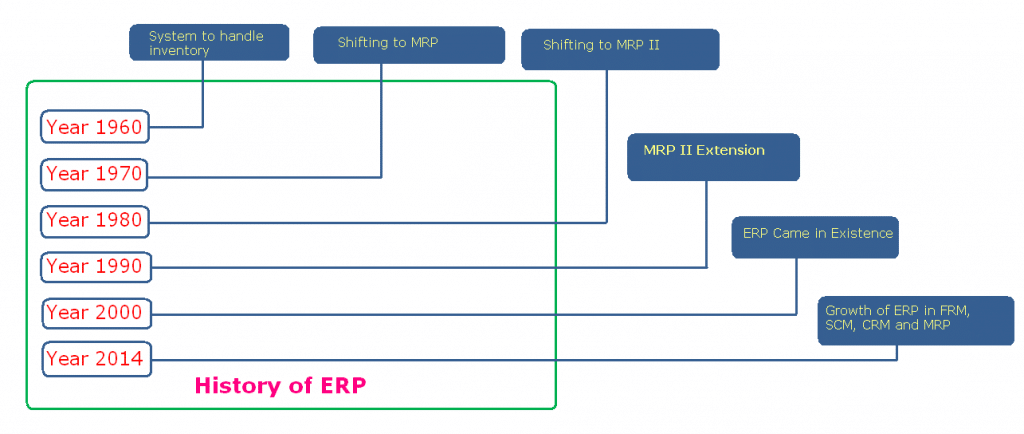
The term ERP was coined in 1990 by the Gartner Group. However, the concept has actually been around since the 1960s. At that time, this concept was only applied to inventory management and control in the manufacturing sector. Software developers create programs to monitor inventory, reconcile balances, and report status. In the 1970s, this program evolved into Material Requirements Planning (MRP) for scheduling the production process.
In the 1980s, the MRP was developed to cover more manufacturing processes, thus changing its name to MRP-II or Material Resource Planning. By 1990, this system had more functions beyond inventory management and other operational processes to other back-office functions such as finance, machinery, project management, and HR. In this year the term ERP began to be used.
As the Y2K computer problem arose and the imminent introduction of the Euro, companies in the 1990s rushed to update their existing systems. Many also choose to completely change their system by adopting an ERP solution. Then, in 1998, NetSuite was founded, with the aim of creating a system that could be used throughout the company and could be operated via the internet.
In the 2000s, the Gartner Group re-developed ERP by releasing ERP II. This is the first cloud-based ERP output. This system offers a high level of flexibility, because it can go beyond the boundaries of territory and time (as long as it is connected to the internet). Now SaaS (Software-as-a-Service) ERP systems are increasingly in demand by various businesses, especially SMEs because of their high level of mobility and more affordable prices.
What Industries Can Use ERP?
Although ERP was originally designed for the manufacturing industry, now this software has expanded to various other sectors such as services, education, retail and wholesale, real estate, food and beverage, health, and even government.
Every company or organization naturally manages employees, buys products or services, sells or distributes things, and records finances. ERP allows companies from all industries to integrate and manage all of these basic functions.
What is the Use of ERP for Your Business?
Have you ever wondered why so many businesses are looking for ERP solutions? What do they need? They will not consider implementing an ERP system if this system does not have an advantage for their business. According to statistical data last year, there were as many as 81 percent of companies in the process of implementing ERP or had successfully implemented it. The following are some of the benefits that you can get by implementing ERP software in your company.
1. Optimizing Efficiency
The ERP system functions to simplify various operational activities that take a lot of time and effort. Complex tasks such as checking inventory, assigning tasks to employees, monitoring work hours, payroll, preparing financial reports, can all be done automatically.
With less manual work, the team can focus more on their work without having to bother other teams. For example, the marketing team can monitor daily web traffic reports without having to request it from the IT team, or the accounting team can make reports related to sales without having to rely on the sales manager.
ERP also provides fast data access for managers and stakeholders in the company. Decision makers can monitor key performance indicators throughout the company only through a dashboard. All required data can be generated in real time.
2. Enhancing Collaboration
Inter-departmental collaboration is a crucial part and is often needed in business. ERP software breaks down the dividing walls between departments. With data entered into a centralized and consistent ERP system, one department can access data from another department. SaaS ERP or cloud-based can expand inter-team collaboration in all branches of the company through the internet.
3. Save on Operating Costs
ERP also helps companies save on operational costs. Because most operational activities are automated, various disruptions, obstacles and damage can be anticipated well. All complex work can be completed faster so this can reduce lead time. Companies can also reduce labor costs, because ERP is able to take over various manual jobs.
4. Improve Data Security
ERP has a firewall and control restrictions to prevent data breaches. All data is stored in a centralized system so that access points can be monitored closely and security is maintained. Admins who are responsible for managing company data can provide limited access rights to employees. For example, the HR manager can hide important data only for himself and the stakeholders while giving employees the right to access their respective financial data.
Admins can also quickly terminate the access of dismissed employees and grant access rights to new employees. The ERP solution also shows user activity, so the admin can easily identify unauthorized actions or suspicious activity patterns in the system.
5. Make accurate business forecasts
One of the most crucial things for business progress is the right forecast. Stakeholders in the company rely on reports to make forecasts that will ultimately influence the decisions they make. Therefore, it is very important for businesses to get real-time, complete, and consistent reports. ERP solutions can facilitate all of that.
Reports in the ERP system use sophisticated analytics and filters that can filter out inconsistencies in the data. This system also ensures that the data obtained is generated at the correct time. Accurate business reports will help stakeholders produce the best decisions for their business.
When Should You Decide to Use ERP?
Every business is unique and has different challenges. The question now is, when should you decide to use ERP? The following are some parameters that indicate that you should consider using an ERP system as soon as possible.
Your staff spends too much time on tasks that should not have been done manually
You don't have quick and easy access to the data you need to make business decisions
You work with various vendors or suppliers from various regions
You have many different applications that you have applied to your business for years, but they are not connected to each other
You cannot monitor your inventory level every day
You spend too much time searching for information, trying to increase productivity and efficiency, and integrating various functions in your business
Your staff cannot easily collaborate or share information with each other
You cannot access important business data and information while outside the office
You are often late when you resolve problems; in other words, you cannot be proactive in identifying problems in your business processes
If most of the points stated above are relevant to you, then this means it's time for you to immediately find the right ERP vendor.
Types of ERP software development
There are several types of ERP development that are trending on the market today. So you don't get confused when ERP vendors offer you this solution, try to study the following three types of popular ERP development.
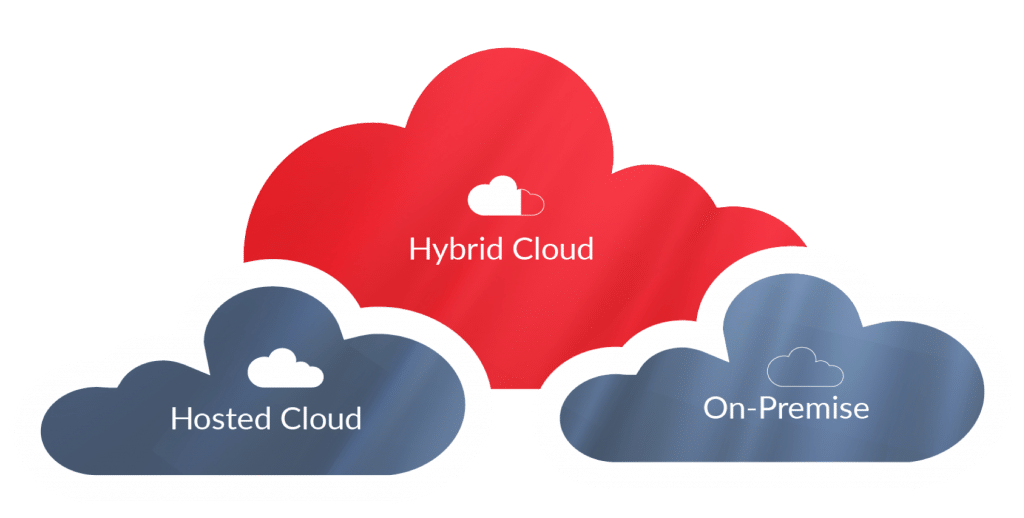
On-Premise ERP
This is also called conventional ERP or on-site ERP. This ERP system is installed locally on computer hardware and servers managed by IT staff. So, the company manages this ERP system in-house.
Initial investment for conventional ERP is fairly high, because companies need to buy hardware such as servers to run the system. The company must also employ IT staff who are responsible for managing and maintaining the system. In addition, upgrading this system also requires a lot of effort, because the team has to deploy on multiple computers and re-implement various adjustments and integration with systems that have been used before.
Although it requires a lot of cost and effort, conventional ERP solutions are still in great demand because this system allows companies to handle their own data thereby ensuring security. In addition, this system also offers convenience for customization and gives more control over the implementation process. Conventional ERP solutions are usually more popular among large scale companies.
Cloud ERP
Cloud-based ERP system or also called SaaS is a type of ERP that allows companies to manage data centrally through an internet connection. ERP vendors are responsible for the smooth running of this system and oversee it through the backend. Users only need a username and password to be able to access the system from the browser.
The investment costs for Cloud ERP are much lower compared to conventional ERP investment costs. However, users are charged overhead (usually per month) that must be paid as long as they use the system. This ERP system is more popular among small and medium scale businesses. The advantages of Cloud ERP include the following:
Faster Deployment
Unlike on-premise ERP, Cloud ERP does not require additional hardware so companies do not need to waste time on procurement and installation of IT infrastructure. The time to install a cloud-based ERP usually only takes 3-6 months while a conventional ERP solution requires at least 1 year.
Periodic System Updates & Upgrades
Cloud-based ERP systems are constantly being upgraded by their providers and you can be sure that you always use the latest and most up-to-date ERP systems. Meanwhile, if you are using a conventional ERP system, updates and upgrades must be done by removing adjustments that have been used before.
High Level of Mobility
Cloud ERP solutions allow you to keep an eye on your business anywhere and anytime. Because this type of ERP is website-based, users can access the system through supported browsers. You do not need to come to the office to see the various data that you want, because you can access it from your cell phone or tablet.
Hybrid ERP
Hybrid ERP is a combination of on-premise ERP and Cloud ERP and ERP solutions. This type of ERP system serves as a logical solution for many companies who want to improve their current conventional ERP system without having to change it. In addition to separating functions between conventional and cloud-based ERP, Hybrid ERP also helps companies to integrate or add functions to existing ERP systems at a minimum cost.
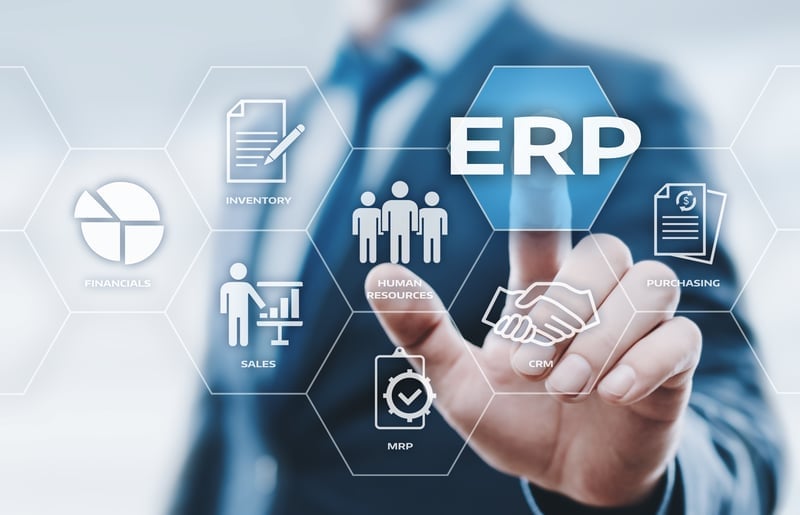
Common Modules in ERP Software
You have understood what ERP is and what kind of development and usability. Now you need to know what modules are usually available in ERP in general.
Accounting (Accounting)
The accounting module functions to manage cash inflows and outflows within a company. The module also helps companies handle various accounting transactions such as expenses, balance sheets, ledgers, bank reconciliation, budgeting, tax management, and others. Company financial statements can be made with just a few clicks with this module.
CRM
The CRM (Customer Relationship Management) module helps improve sales performance through better customer service and build healthy relationships with customers. This module also helps companies manage and track prospect and customer information such as communication history, calls, meetings, transaction data they do, duration of contracts, and others.
HRM
The HRM (Human Resource Management) module helps improve the efficiency of the HR or HR department in the company. This module helps manage employee information such as performance appraisals, job descriptions, skills, attendance, leave, and others. Payroll Management is one of the most important sub-modules in the HRM module that functions to manage salaries, travel expenses and cost recovery.
Sales
This module functions to handle sales workflows such as sales questions, offers, sales orders, and invoices. The integration of Sales and CRM modules can speed up the sales cycle and generate greater profits for the company.
Inventory
The inventory module is useful for tracking and managing stock in a company, including monitoring inventory levels, scheduling replenishment, forecasting and making inventory reports. A good ERP system allows integration of inventory modules with a barcode or SKU scanner. The inventory module will be more effective if it is integrated with the purchasing module.
Purchasing
This module manages the processes involved in the procurement of goods. This includes: supplier lists, demand and supply analysis, Purchase Orders, Goods Receipt Notes, and stock updates. This module can be integrated with the inventory module for more optimal inventory management.
Manufacturing
This module functions to improve efficiency in the manufacturing process in a business, such as; product planning, material routing, daily production monitoring, and manufacturing of Bill of Materials. A good ERP system allows manufacturing modules to be integrated with barcode or RFID scanners.
Factors to Consider When Choosing ERP Software
You already know what ERP is and what this software is for your business. Now you need to know what factors you need to consider before you use ERP. The following are some things to note:
1. Your business needs
Every company has different needs. The challenges faced by your company may be different from other companies. Good ERP software can be tailored to the unique needs of every business. Make sure you understand what challenges your business faces and what solutions you expect from ERP. Describe all your needs in detail to your vendor so that you get an ERP system with specifications and features that suit your needs.
2. Vendor experience
Find out detailed information about your ERP vendor, including their experience in providing ERP solutions for various businesses. Who are their clients? What are their industries? How long has the vendor been operating? Ask for testimonials from each of their clients. If you need to ask their clients directly about the benefits they have received since using ERP software (including their relationship with vendors and the services they get from vendors).
3. Support from vendors
When you talk to ERP vendors, you should not forget to ask about what support they provide. Support is a very important element in every stage of the project, which consists of; needs analysis, project planning, implementation, configuration, training and mentoring, to post implementation. Make sure that your vendor can be easily contacted when your ERP system is experiencing problems or when you have questions about how the system works.
4. Ease of integration and customization
A good ERP software makes it easy for users to integrate and adjust it. You may not need a lot of integration or adjustment now, but your business needs can change at any time. You might want to add modules or actually reduce them in the future. As your business gets bigger, its needs become increasingly complex. So, make sure that the ERP you choose can be easily adjusted to scale your business.
5. Implementation process
One of the main factors that you need to consider when choosing ERP is the duration of its implementation. The duration of implementation usually depends on how much adjustment needs to be made. The more adjustments, the longer the implementation process. Cloud-based ERP implementations tend to be faster and simpler than conventional ERP implementations. So, think carefully about which type of ERP deployment is more beneficial for your company.
Conclusion ERP software development
In the midst of increasingly fierce business competition like now, you must be able to keep up with various rapidly changing technological trends. Running your business with the old or manual method will only make your business lag behind the others. If other business owners have automated their business processes, why haven't you?
ERP can simplify various complex business operational activities so as to increase efficiency, save costs, and optimize the productivity of your business. This software can be used by every business at various scales; both small, medium and large.
Now you know what ERP software is, its short history, its use, the type of development, the modules that are usually included, and the factors you need to consider when choosing it. Next, you only need to identify the various challenges you face and the solutions you need.
If you are still confused about the modules you need in the ERP system, don't hesitate to ask the right ERP solution provider
The decline in retail business sales in the midst of the outbreak of the corona virus or COVID-19 makes a number of businesses have to rack their brains harder to keep the business going. It has been proven, many successful business people have developed effective product marketing strategies, despite the extremely difficult circumstances.
Of course, high creativity and an unyielding spirit are a must in order to survive in this difficult time. Now, to make it easier for you to develop a cool product marketing strategy, we will give you a few examples that you can follow or process yourself again.
Improve communication with customers
In this time of uncertainty, you just have to make communication with loyal customers more intense. Reassure customers that you still continue to provide the best service. Send messages via email or WhatsApp broadcast is the best way.
Create personalized messages with the help of CRM software. Offer assistance to your customers regarding your business services. For example, freeing up subscription fees for a while, or giving away free products to your customers who need them.
Product marketing strategy when corona: selling substitute products
Do not rush into despair when your main product is devoid of customers since the corona virus outbreak. With a little creativity, you can actually reap profits in these difficult times. If deemed necessary, swerving by selling substitute products is one solution that many entrepreneurs take.
For example, when the government announced that cloth masks were proven to prevent transmission of the corona virus by up to 70 percent, many entrepreneurs saw this news as an opportunity. From tailors, fashion designers, to cosplay costume makers, they also sell cloth masks with unique patterns and motifs.
Create a unique product marketing strategy
Holding a big discount won't work if your customers still have to leave the house and come to you for a transaction. At a time when the call for #DiRumahAja blows faster, massive discount promotions will only waste your valuable money.
The most effective product marketing strategy in this time of anxiety is to make a donation. Show that you care about those who are more in need. For example, Crocs footwear manufacturers recently distributed free shoes to doctors and nurses on the theme of the Sharing a Pair for Healthcare campaign.
Make as much as you can. No need to hold a massive donation campaign like Crocs or Twitter CEO Jack Dorsey who donated up to one billion dollars. Distributing free food to hawkers or motorcycle taxi drivers online is a fairly effective way. Video and share it on social media channels to attract your customers.
Don't panic, don't give up!
Panic is the first thing that will take your business to the brink of collapse. Stay calm so that you can do calculations and develop effective product marketing strategies even though buyers are rarely seen. Remember that you do not face this difficulty alone.
Take preventive measures such as reorganizing your business financial management, devising specific business strategies to fight corona viruses, or take advantage of web-based applications to minimize contact with others when making transactions.
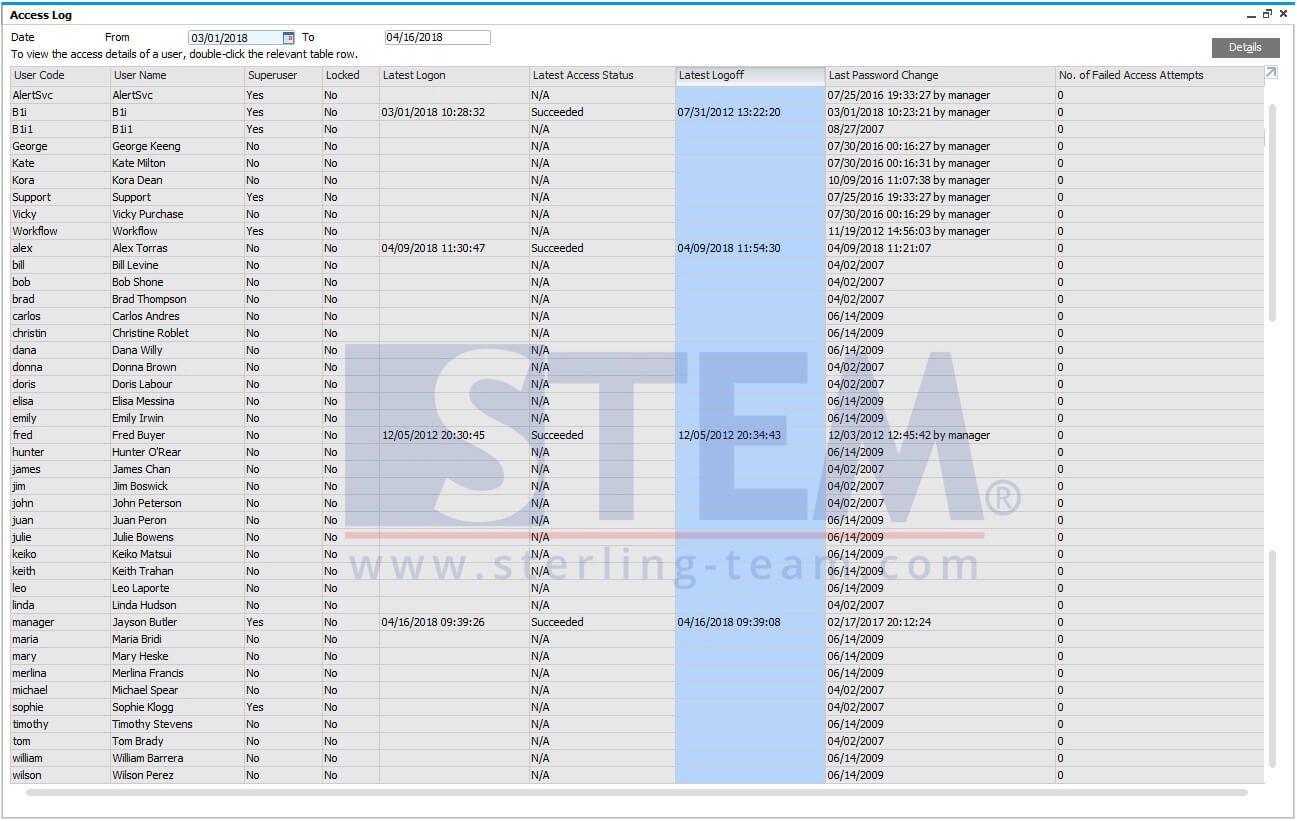
In SAP Business One, there are 2 types of information that provides about the details of user access in the SAP Business One application, and what data is modified by that user (edit / update) in documents in SAP. User Access Log (Please open: Tools> Access Log) This option is often used to monitor a user's daily activities in SAP, when he logs in to the system, when logout and other information about whether or not a particular user fails to access seen from the last time this user successfully logged into the SAP application. As an internal IT and superuser, you can monitor your users' access by running a specific query using the USR5 table.
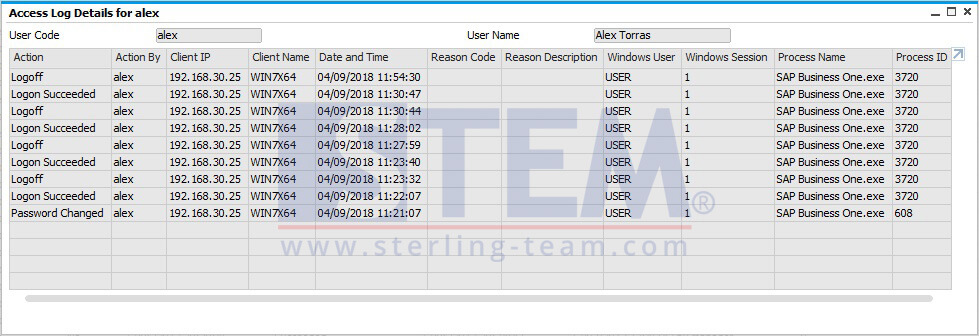
And if you click the Details button, there will be more detailed info per each user you choose:
Action Describesthe day and hour of the success / failure logon process, changing the password, and whether or not it is a superuser, etc.
Action By Describes information about the UserID of the user carrying out the related action.
Client IP The IP address of the client computer connected to SAP Business One that the user uses.
Client Name The name of the client computer that the user uses to access SAP Business One.
Data and Time Describe the day and time of the actions / actions related to what is in the action column.
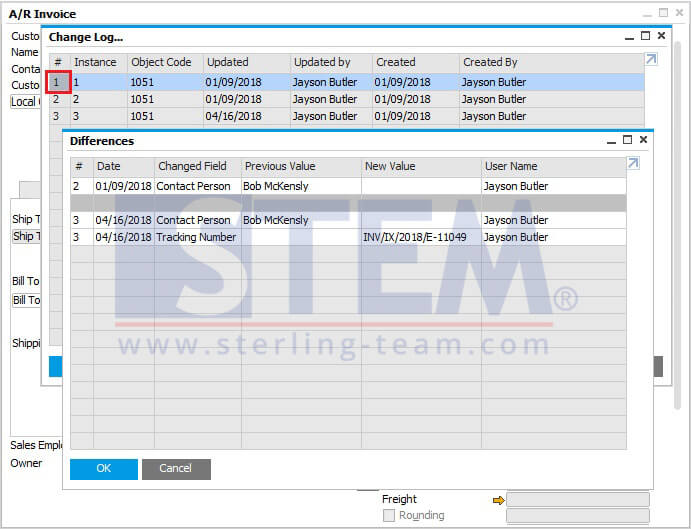
Change Log (Please open the menu: Tools> Change Log) Other information, you can also open one of the marketing documents or master data, please try "Change Log". And you will find information about who created the document, changing certain data from the document until the time the change occurred, all of that you can see.
Extra info: Available only for marketing documents: You can run a query in the history table, the ADOC table, to track and trace the history of your document. Don't forget to include info about the Document Number, and Object Type before you execute the query in the ADOC table so that the information is as accurate as possible. Example of a simple query to see the 'Change Log' of AR Invoice from the previous screenshot:
SELECT * FROM ADOC T0 WHERE T0."DocNum" = '1049' AND T0."ObjType" = 13