Suppose you have implemented SAP in your company and now you want to place all your shares in the SD system. For this, using T-Code: MB1C with movement type 561, this type of movement indicates that we want to receive goods without supporting documents such as Purchase orders. If through Purchase order can be with movement type 501.
A new window will open then input the create, plant, storage location and movement type dates.
Then choose movement type 561
A new window will open. Enter the material code and the quantity that needs to be created and then click Save.
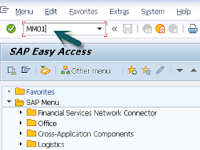
A material is made in the SAP system by a purchasing department or a specialized material manufacturing department. After it is made, the person who manages the material specifically for the related sales must extend the material to the sales view section. Use T-Code: MM01 to make material and to check changes, using T-Code: MM04.
Select Sales Org Data 1, Sales Org Data 2, Sales: General / Plant Data then click the green check mark.
Then a new window will open. then enter the Plant, Sales Organization and Distribution Channel for the material to be extended. Repeat this for the material that you want to extend.
Then a new window will appear and enter data for the following fields:
Material Details
Base unit of Measure
Division
Material Group
Tax
Then for the Sales Org 2 tab. Fill in the fields that are mandatory.
Material Statistics Group
Gen Item Category Group and Item Category Group
For the General / Plant tab. Enter the value for Availability check, Transport group and loading group, SerialNoProfile (fill if the unit of measurement is different, optional) then click enter.
There are various types of customer account groups that can be created, namely:
Group
Name
X001
Domestic Customers
X002
Export Customers
X003
One Time Customers
How do you create a Customer Account Group?
How do you create a Customer Account Group? Enter SPRO T-Code → SAP IMG Reference → Financial Accounting → AR and AP → Customer Account → Master Data → Preparation to create customer master data → Assign Account Group with screen layout (Customer) → Execution
Then Select New entries
After that, enter data into the following fields:
Customer Account Group
Name
Field Status
When selecting company code data a new window appears and after that select account management.
After that select the Req. Entry for field reconciliation account. After that click Save.