In this first part, it will explain the scope of work, objectives, installation, and how to develop ABAP in testing.
1. Scope of Work
Each ABAB system is divided into 3 parts: the first is the database used to store data and programs, the second is the application server, and the third is the client. The discussion of this POC only covers the server application.
The ABAB SAP NetWeaver Application Server can be broken down into several sections, each of which can be placed in a container. The Server Instance application is prioritized to be placed in containers
because it doesn't have a big impact on other applications, and their needs tend to be easily measured. However, we can also choose to deploy several mandatory components from ABAB Central Services, namely Message Server and Enqueue Server. In the final stage, we deploy SAP Webdispatcher and SAP Router to be configured.
The discussion of the SAP HANA database is beyond the current discussion, the SAP Hana database is considered to provide an external resource that can be linked through a credential configuration.
2. Configuration
Docker Image and Kubernetes Deployment File
In Kubernetes, the application is "broken" before creating an image container with the Kuberntes YAML deployment file.
Our goal is to build an ABAP image with an environment that is configured using the Kubernetes YAML file. At the time of deployment, ABAP image will be injected into the Kubernetes environment.
Some of the attributes are static, cannot be changed, and will not be configured in this POC are:
SAP SID
SAP Instance Number
SAP Admin User
We also chose the most recent SAP Kernel and is compatible with NetWeaver and S4Hana.
3. Deployment in Kubernetes
Application Server
The real workload on the ABAP Application Server system is on the server side. On this side, memory and CPU will work more, besides the database. So it is important to define workload first. It is not recommended to reduce the capacity or scale down of the Application Server Instance because it risks damaging user sessions. Whereas deployment can be reduced to user-controlled orders, in contrast to "Statefulset" which is reversed-ordered which allows it to scale down regardless of the user's session load.
We solve the shutdown problem by implementing the "Horizontal Pod Autoscaler" logic: Priority annotations are assigned according to session load as they occur. Whenever scale down is done, the server with low priority will be shutdown.
As an application whose manufacturing process produces several log files, the sidecar container is used to pull logs and forward the target log to each Application Server pod.
Message Server and Enqueue Server
Message Server is a single instance, like an enqueue server. For better flexibility, an image container is created by placing it in 1 pods called ASCS (ABAP SAP Central Instance). Since it is necessary for the application server to reach the message server via static DNS, therefore placing ASCS pods in statefulset can solve the problem.
Since the message server becomes stateless, restarting the container is not critical. Enqueue Server keeps the table locked so it's not stateless. To implement high availability for enqueue server, it is recommended to create a backup enqueue server to store the results of copying tables. This is called enqueue replication and can be done by creating other singleton pods.
SAPRouter and Web Dispatcher
SAP Router functions to connect clients to the application server in accessing the system through the SAP GUI. Unlike the Kubernetes load balancer, the SAP Router knows the SAPDIAG protocol and forwards it to the session-related connection. SAP Router is stateless and can be scaled easily if needed.
Client Communication and Connectivity
After all SAP components are arranged in podernetes, we must ensure that all components can be connected to each other, including with clients.
- Services
Communication between pods in the Kubernetes cluster is done through services. Since Kubernetes does a port mapping automatically on the node where several pods open the identic port, this configuration allows the SAP application server to be upgraded on a single node without conflicts between ports. The statefullset Deployment and ASCS application servers are stored in the Kubernetes service.
–Load Balancer
Connections from external clients (SAP GUI, Web) to services are done by an external load balancer. The type of load balancer depends on the infrastructure in which Kubernetes runs. For this POC, we use OpenStack with HAProxy load balancer, like a bare-metal infrastructure. Deploy load balancers require an API connection to the IaaS layer.
–Load Balancer
Connections from external clients (SAP GUI, Web) to services are done by an external load balancer. The type of load balancer depends on the infrastructure in which Kubernetes runs. For this POC, we use OpenStack with HAProxy load balancer, like a bare-metal infrastructure. Deploy load balancers require an API connection to the IaaS layer.
–Namespaces
In the final stage, arrangements are made for all SAP Kubernetes objects in the Kubernetes Namespace which have been split into several clusters. Furthermore, several SAP Instances can be stored in a single cluster by dividing them into several namespaces, such as Sapqa, sapdev, sapprod.
There may be situations when you need to repeat your code / Looping. In SAP ABAP, statements are executed sequentially: The first statement in a function is executed first, followed by the second, and so on. Loop statements allow us to execute a statement or group of statements several times and the following is the general form of a loop statement in most programming languages. The ABAP programming language provides 3 types of Loop statements such as:
WHILE loop
Do loop
Nested loop
WHILE loop
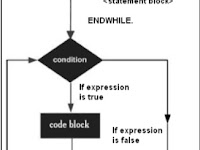
WHILE loop statements repeatedly execute target statements as long as certain conditions are true.
The general format of the WHILE command is as follows:
WHILE

.

ENDWHILE.
A block statement can be a single statement or a block statement. While Loop executes the statements attached by the WHILE and ENDWHILE commands until the logical expression becomes false.
This is the line: 0
This is the line: 1
This is the line: 2
This is the line: 3
This is the line: 4
This is the line: 5
This is the line: 6
This is the line: 7
Do loop
The unconditional loop repeatedly makes several statements without specifying any conditions. The DO statement applies the unconditional loop by executing a set of statement blocks several times without conditions. Syntax 'Times' imposes restrictions on the number of loop paths, represented by 'n'. The value 'n' cannot be negative or zero. If zero or negative, the statement in the loop cannot be executed
DO and WHILE statements can be tested and combined with other forms of loops. Each nested loop will have its own SY-INDEX which is created and monitored by the system.
In this example, the outer DO loop is processed twice and the inner DO loop is processed 10 times, each time the outer DO loop is processed. So in this case, the inner loop is processed 20 times.