Showing posts with label SAP HANA. Show all posts
Enable Service manager in SAP Business One - HANA Linux

Enable Service manager in SAP Business One - HANA Linux

I will discuss the article how to activate Service manager on Linux, especially the HANA version of SAP Business One

the first thing you need to do is make sure you login to the linux server first, after a successful login the next is
1. Open My Computer and open the Hana / Shared / NDB / HDB00 folder
2. then right click open in terminal

3. Then type su - ndbadm as shown below


4. then click enter, and will display as shown below and type "HDB Start"

5. Click Enter and wait until it displays a message like the image below

6. After HDB is activated, the next step is to activate the service manager by opening the /etc/init.d folder, then right-clicking open in terminal

7. After the terminal appears type ./sapb1servertools start

8. wait until the writing done appears as shown below


Once active, please run your SAP.


SAP ECC migration to S/4HANA (SAP Hana)

SAP ECC migration to S/4HANA (SAP Hana)

SAP's decision to end support for SAP ERP Central Components (ECC) at the end of 2025, makes SAP users must move quickly to migrate their systems to S/4Hana (SAP Hana).

To help CIOs and SAP users migrate the SAP system, here are five important points to understand and consider before migrating SAP ECC to S/4Hana:

1. Readiness to migrate to S/4Hana

Based on a 2019 survey by the Americas ‘SAP Users’ Group (ASUG), it explains that around 56% of respondents still do not have plans to migrate to S/4Hana, even 12% of respondents are not interested in migrating. At the same time, SAP users revealed the reason why they did not migrate was the priority of implementing other systems that were considered more important, the lack of resources and technology they had, and the inadequacy of their staff. However, SAP still decides all ECC users to migrate to S/4Hana by the end of 2025.

 2. ECC end-of-support

SAP together with its partners continues to encourage SAP users to migrate from ECC before a predetermined deadline. SAP provides another alternative if its users are still not ready to migrate, to use other solutions such as C / 4HANA, Concur, Success Factors or Ariba, said Len Riley, commercial advisory practice leader at UpperEdge.

3. Business Case is very important to move to S/4Hana

Before migrating to S/4Hana, SAP users are required to really understand the technical needs to run the SAP system and make a business case first. SAP users can determine to run their system on the cloud or their respective servers, of course with their respective advantages and disadvantages.

Actually ECC itself has developed modules for a variety of industries and a variety of functionalities, but the SAP Leader considers these capabilities have not been able to process large amounts of data and real-time. That is why SAP launched S / 4Hana to process large data and has high complexity.

4. Implementation of "Intelligent Enterprise"

SAP S/4Hana is designed to be able to answer the needs of intelligent enterprise by focusing on processing information in detail that is approaching real time. To get a complete intelligent enterprise, SAP users are advised to use a complementary platform to help automatically retrieve data such as IoT sensors, which can be used for analytics, artificial intelligence, and machine learning. S/4Hana is able to present it all in an interface that is easy to navigate.
SAP HANA Studio Trace Configuration

SAP HANA Studio Trace Configuration

This page introduces the various system traces available with SAP HANA which can be used to collect diagnostic information.

SAP HANA Studio Trace Configuration  

SAP HANA Studio provides a graphical user interface for enabling and configuring a number of the most common and important traces.
To access the trace configuration in SAP HANA Studio, open the HANA System in the SAP HANA Administration Console  Perspective and click onto the Trace Configuration tab.
 

Prerequisites

To configure traces, you must have the system privilege TRACE ADMIN. To configure the kernel profiler, you must have the SAP_INTERNAL_HANA_SUPPORT standard role.
The table below shows the list of traces which can be configured from within SAP HANA Studio, their default status and the primary distinguishing purpose of that trace.

Available Traces

Trace
Default Status
Purpose
Related Content 
Database Trace Active
The database trace records information about activity in the components
of the SAP HANA database. You can use this information to analyze performance
and to diagnose and debug errors. <more>
 
SQL Trace InactiveThe SQL trace collects information about all executed SQL statements and saves
it in a trace file for further analysis. It is inactive by default.
Information collected includes overall execution time of each statement, the number
of records affected, potential errors (for example, unique constraint violations) that
were reported, the database connection being used, and so on. <more>
User-Specific Trace Inactive
The user specific trace is used to trace activity through the available components
(i.e. IndexServer, NameServer) for a specific application or database user.
 
Performance Trace InactiveThe performance trace is a performance tracing tool built into the SAP HANA database.
It records performance indicators for individual query processing steps in the database
kernel. It is inactive by default.
Information collected includes the processing time required in a particular step, the data
size read and written, network communication, and information specific to the operator
or processing-step-specific (for example, number of records used as input and output). <more>
How to use HDBAdmin to analyze performance traces in SAP HANA
End-To-End Traces InactiveThe predefined end-to-end traces are used by applications to trace activity through all
the available trace components. i.e. IndexServer, NameServer
 
Expensive Statements Trace InactiveExpensive statements are individual SQL statements whose execution time exceeded
a configured threshold. <more>
SAP HANA Academy - Using the Expensive Statements Trace
Kernel Profiler Inactive
The kernel profiler is a sampling profiler built into the SAP HANA database. It can be used
to analyze performance issues with systems on which third-party software cannot be
installed, or parts of the database that are not accessible by the performance trace. <more>
Caution To be able to use the kernel profile, you must have the
SAP_INTERNAL_HANA_SUPPORT role. This role is intended only for SAP HANA development support.
 

Locating the Trace/Diagnostic Files

Diagnosis files include log and trace files, as well as a mixture of other diagnosis, error, and information files. In the event of problems with the SAP HANA database, you can check these diagnosis files for errors.
You can access diagnosis files on the Diagnosis Files tab of the Administration editor.
 

To access the files from the operating system level, they are stored at the following default location: /usr/sap/<SID>/HDB<instance>/<host>/trace.
Get to know SAP S/4HANA and SAP S/4HANA Cloud

Get to know SAP S/4HANA and SAP S/4HANA Cloud


SAP S/4HANA  is a series of ERP businesses that are based on a database in SAP HANA memory that allows companies to conduct transactions and analyze business data in real-time.

SAP released S/4HANA  in February 2015. S/4HANA  aims to provide ease of use and management, as well as help solve more complex problems and handle a much larger amount of data than its predecessor. It is available in on premise, cloud, and hybrid with SAP strongly encouraging its customers towards cloud options.

History of S/4HANA  and the difference between HANA and S/4HANA

SAP S/4HANA  is short for SAP Business Suite 4 SAP HANA, which means that this is the fourth version of SAP Business Suite, but is designed to run only on SAP HANA. S/4HANA  comes from SAP HANA, a database in memory that was released in 2011. SAP HANA makes it possible to process large-capacity operational and transactional business data in real time. In 2013, SAP launched the SAP Business Suite at HANA, an HANA-based ERP system that includes modules for CRM, SRM, PLM and SCM. The suite on HANA is basically a front end SAP ERP business application that runs on a database in HANA memory.

SAP S/4HANA  needs to rethink the concept of database and rewrite 400 million lines of code. According to SAP, these changes make the ERP system easier to understand and use and faster for developers. SAP sees S/4HANA  as an opportunity for businesses to rediscover business models and generate new revenue by utilizing the internet from various things and Big Data by connecting people, devices, and business networks.

Also, because S/4HANA  does not require batch processing, businesses can simplify their processes and direct them in real time. This means that business users can get information about data from anywhere in real time for planning, implementing, predicting and simulating, according to SAP.

S/4HANA  and SAP Fiori UX

One of the keys to S/4HANA  is that it uses SAP Fiori UI rather than the traditional SAP GUI. SAP Fiori is a collection of commonly used S/4HANA  functions displayed in simple tile designs that are ready for consumer use and that can be accessed on a variety of devices, including desktops, tablets, and mobile devices.

S/4HANA  Module

One of the main components of S/4HANA  is SAP Finance (formerly Simple Finance) which aims to streamline financial processes and enable real-time analysis of financial data. SAP Finance helps companies adapt their financial and non-financial data into what SAP calls a source of truth. Some Business Suite users use SAP Finance as a first step towards S/4HANA . SAP has added more modules and functionality for the next release, such as:

S/4HANA  1511 - released November 2015 - which introduces a logistics module called Materials Management and Operations (MMO).
S/4HANA  1610 - released in October 2016 - which includes modules for supply chain management, including Advanced Available-to-Promise (aATP); Inventory Management (IM); Material Requirements Planning (MRP); Extended Warehouse Management (EWM); and Environment, Health and Safety (EHS).
In January 2018, SAP announced S/4HANA  HCM, an alternative on-premise Human Capital Management (HCM) application for SAP SuccessFactors, the company's HCM SaaS application. SAP describes S/4HANA  HCM as a companion application that runs side by side or integrated with S/4HANA , but is not a module that is included. S/4HANA  HCM will be available in 2023 and will be supported by at least 2030, according to SAP.

s4hana sap
SAP S/4HANA  Cloud

In March 2017, SAP released S/4HANA  Cloud, a cloud-based version of S/4HANA . S/4HANA  Cloud is best suited for organizations with 1,500 or more employees who might want to run a two-tier ERP system, where corporate entities run a complete business chain such as SAP ERP Central Component or S/4HANA  on-premise and implement S/4HANA  Cloud at the level division or subsidiary.

HANA S / 4 Cloud includes new generation technologies such as machine learning through a tool called SAP Clea, and a conversational digital assistant bot called CoPilot.

S/4HANA  Cloud is a SaaS application with a new edition released every quarter. The naming follows the local model year and month of release, so SAP S/4HANA  Cloud 1709 was released in September 2017.
SAP S/4HANA  embedded analytics

S/4HANA  includes embedded analytics that allow users to carry out analytics in real-time on direct transactional data. This is done through Virtual Data Models, prebuilt models, and reports based on the SAP HANA Core Data Services that analyze HANA operational data without requiring a data warehouse. Analytic functions are equipped with S/4HANA  software and do not require a separate installation or license.

SAP S/4HANA  Cloud

SAP S/4HANA  Cloud is the SaaS version of SAP S/4HANA  ERP, a series of integrated business applications. SAP S/4HANA  Cloud was launched in February 2017. According to SAP, the aim is to provide a "Next Generation Intelligent ERP" system that enables companies to achieve digital transformation. SAP S/4HANA  Cloud is built on SAP HANA and utilizes processing in HANA memory and data accessibility in real-time, but makes it available in the SaaS model.

Implementing SaaS means users can access all S/4HANA  functionality without committing resources to hardware, databases, or IT staff. S/4HANA  Cloud includes technology that can help bring "intelligence" into ERP applications, including machine learning, virtual and augmented reality, blockchain, and technology that supports sound. The main functions of the S/4HANA  Cloud include finance, procurement, sales, professional services and manufacturing.

The three pillars of smart S/4HANA Cloud ERP

SAP S/4HANA Cloud includes three technologies that form the foundation of intelligent ERP, according to SAP:

Digital Assistant. SAP S/4HANA Cloud uses SAP CoPilot, a digital conversation assistant (or virtual assistant) for companies that allows users to interact with ERP applications and functions. SAP CoPilot uses contextual data about users and the tasks they perform to provide information relevant to that task.
Machine Learning. SAP S/4HANA Cloud includes technology that automates repeated actions or tasks, which can be repeated and error-prone when done manually, and learn how to do it more efficiently.
Predictive Analytics. S/4HANA Cloud has included analytics that can help predict the outcome of actions. Analysis tools can be configured for user needs and can be developed into applications, such as inventory management applications that can predict when stock will arrive or sales quotation applications that allow sales managers to determine the probability of converting sales quotas.
Implement, configure and run SAP S/4HANA Cloud

SAP S/4HANA Cloud is available as SaaS with various subscription options from SAP, which owns and operates the platform. This is intended to reduce implementation time, costs and risks. SAP handles all back-end management, including upgrading, security and governance. All users generally need to do is integrate their data, then turn on the processes they need and turn off what they don't need.

SAP S/4HANA The cloud version is scheduled to be updated quarterly, according to SAP. Users access SAP S/4HANA Cloud from a web browser, and all business applications are launched from SAP Fiori Launchpad. To access it, users only need an internet connection, URL and access rights.

Benefits of SAP S/4HANA Cloud

SAP identifies five ways companies can benefit from implementing S/4HANA Cloud, including faster ROI, increased business agility, lower total cost of ownership, better governance, and smarter ERP that increases efficiency.

As a series of next generation cloud ERP business suites, S/4HANA Cloud prepares businesses for the digital future. This is expected to be able to integrate business processes, be able to turn real-time data into actions and increase employee productivity, thus enabling companies to change existing business processes and develop new things.


Configuring Single Sign-On for the SAP HANA Cockpit

Configuring Single Sign-On for the SAP HANA Cockpit

This guide provides detailed instructions on how to set up Single Sign-On user authentication for a resource through the cockpit. Enabling Single Sign-On allows a a cockpit user to log on to a resource without being prompted for database user credentials.

Note that SSO is only possible for the following SAP HANA monitored resources:
  • SAP HANA 1.0 SPS 12 revision 14 or later
  • SAP HANA 2.0 SPS 01 or later

Enabling Single Sign-On

Prerequisites

  1. You already have a database user with the CATALOG READ, TRUST ADMIN, CERTIFICATE ADMIN, and USER ADMIN privileges granted to it. 
      • In this guide, the username for the example database user is "SSO_USER". You can choose a different username if desired. 
      • To assign the necessary system privileges to an existing user, you can execute the following SQL statements:
          • GRANT TRUST ADMIN TO TESTUSER; 
          • GRANT CERTIFICATE ADMIN TO TESTUSER;
          • GRANT USER ADMIN TO TESTUSER;
          • GRANT CATALOG READ TO TESTUSER;
      • Alternatively, you can also use the UI to assign system privileges to a role, and then assign the role to multiple users. For detailed instructions on how to create a new role through the UI, please refer to the appendix in The SAP HANA Cockpit Security Model
  2. You already have a cockpit user with the Cockpit User Role role assigned to it. 
        • In this guide, the username for the example database user is "COCKPIT_USER". You can choose a different username if desired. 
      • For a detailed guide of how to create a cockpit user, please refer to the Creating a New Cockpit User section in The SAP HANA Cockpit Security Model article.
  3. You already have a database user with the USER ADMIN system privilege 
      • The username for this user is irrelevant to the two other users in prerequisite #1 and prerequisite #2. 
      • In this guide, this username for this database user is "USER_ADMIN". You can choose a different username if desired. 

Procedure

Step 1) From the Cockpit Manager home page, click on Registered Resources tab to see your list of registered resources.
Step 2) Select the resource you want to enable SSO for and click the Edit button to edit the details.
      • Note: SSO can only be setup with a previously registered resource.
          • If you want to setup SSO for a resource you have not previously registered in the cockpit, simply register the resource first, and then click edit after. It is currently not possible to enable SSO during the initial registration of a resource.
Step 3) Enable SSO by clicking the Yes radio button and entering the credentials of a user with the CATALOG READ, TRUST ADMIN, CERTIFICATE ADMIN, and USER ADMIN privileges granted to it. 
Step 4) Click the Save button to save you changes. Exit the Cockpit Manager and navigate to the cockpit.
Step 5) Login to the database as a user with the USER ADMIN system privilege assigned to it (in this example, it is USER_ADMIN),
Step 6) On the Overview page, click the Manage Users link, and select the user from prerequisite #1 (In this example, it is the SSO_USER)

Step 7) To set the JWT mappings, check the checkbox beside "JWT - You must add at least one identity provider" and then click the Add JWT Identity button. Choose one from the Identity Provider drop-down (it's either XSA_APPLICATIONUSER or starts with the name "XS_JWT_XSA_") and turn the Automatic Mapping by Provider off.
Finally, enter the username of the existing cockpit user from prerequisite #2 in the External Identity and click the Save button. 

Step 8)  Log out of cockpit and login as the cockpit user from prerequisite #2. 

Step 9) Go to resources directory and click Choose Authentication. Ensure that the Log on via single sign on radio button is enabled and click Ok. 
Step 10) Click on the resource name to log in. Notice how you are logged into the database as the the user from prerequisite #1 without any prompt for credentials. 

Enforcing Single Sign-On

Enforcing Single Sign-On for a resource removes the option of allowing users to choose between logging on with SSO or logging on with the credentials of a different database user. Instead, users will only be able to log in to a database with SSO. 

Prerequisites

SSO is already enabled for your resource and you have already completed all the steps in the above section. Do NOT enforce SSO until after you have set the JWT mappings for your database user.

Procedure

Step 1) Log into your Cockpit Manager and from the home page, click on the Registered Resources tab. Select the resource you want to enforce SSO  and click the Edit button in the Resource details page. Select the Yes radio button for the Enforce SSO option. 
Step 2) Enter the credentials of the same user that you used to enable SSO. Click the OK button when you are done. 
Step 3) Exit the Cockpit Manager and log in to the cockpit.
Click on the Resources Directory link to see a list of resources that you have access to. Notice that the resource that you enforced SSO for now says "SSO enforced" in the Credentials column. You can now only access the database if you are the cockpit user from prerequisite #2. 
Fun Facts About SAP HANA vs Oracle

Fun Facts About SAP HANA vs Oracle

1. SAP HANA is cheaper than Oracle

If you compare the application platform licensing fees, HANA is cheaper. HANA data reduction world of compression and simplified data models, easy to buy equipment and flexible license packages you can license HANA to get the configuration that matches the Oracle database, including all the features you need. Because SAP does not require additional costs for HA / DR, so it will be more possible to create a robust solution!

And remember that if you buy S / 4HANA in 2015, you will get all future innovations including the price of SAP Business Suite at the HANA runtime license last year.

If you install an Enterprise solution, SAP HANA is available at a single cost for all features, including those that are compatible with Enterprise, multitenant, RAC, Active Data Guard, Partitioning, Advanced Compression, Advanced Security, OLAP, Advanced Analysis, Spatial and Graphics, databases in - Memory, Diagnostic Packages, Tuning Packages, Database Lifecycle Management Packages, and more. If you want to get the best from Oracle, costs will be a hindrance for some companies.

The RAC costs for the Exadata x5-2 complete rack are just over $ 3 million (don't forget the extra $ 1 million for reserve Exadata!). For this reason, most customers do not use the advanced Oracle Functions - too expensive.

2. SAP in Oracle has no future

This might be controversial, but SAP on Oracle has no future. Look at the April 2015 Update Road Map if you want to see what is requested.

For example, if you release work data that is in your SAP to Oracle 12c, you cannot currently update it (yes, seriously!). You cannot use any of Oracle's innovations, including Oracle Database 12c In-Memory, Oracle Database 12c Multitenant, Oracle Database 12c ADO / ILM or Hybrid Columnar Compression for Exadata. And that only limits operations.

In addition, SAP Oracle will only be supported until 2025, and this has beneficial implications for SAP customers, many of whom use a roadmap for 5-10 years. The system is relatively expensive to implement and maintain, as well as customers need to plan ahead.

Up for SAP Business Suite 7.0, SAP S / 4HANA, will only run on the HANA platform. SAP on Oracle has no future.

3. SAP HANA allows new class applications
One of the things that support about working with HANA is that innovation comes very smoothly and often. There have been past updates of HANA coming too often, but the speed has slowed down a bit over the past 18 months, approved for data center use. There are some updates that are more frequent to be adopted at the beginning or those that regulate new functions, but for the most part, for now it is possible to get major innovations every 6 months with a minimum.

HANA SPS09 came in November (soon the datacenter was approved) and it provided a ton of innovations including integrated ETL and maintenance, multitenancy, support for Big Data and IoT, Event Stream Processing and more. Read What's New in SAP HANA SPS09 for more details.

Oracle 12c has been out for 2 years and is now even supported for SAP applications, and innovation has been very rare even since Oracle 11g.

What this means is that HANA allows a new class of business applications to be developed. In S / 4HANA Logistics, SAP achieves more than 70% data reduction by using redundancy. What happens if we now mix in spatial awareness of products and customers, how can we activate maintenance and manage proactively in the right place?

4. No Hardware Lock-In

To date, there are 538 configurations in the SAP HANA Certified Hardware Directory and this number continues to increase every day. You can run HANA on anything from VMWare tools together with only slither 64GB of memory, up to the 112TB cluster, and so on. There are 22 Certified Enterprise Storage solutions if you want to reuse existing hardware assets.

What's more you can keep an honest vendor because hardware configurations are very easy to compare, so you can decide what provides you with the right value for money and functionality.

Instead, Oracle locks you in 1/4, 1/2, and full rack solutions that you can see on the Oracle Engineered Systems Price List. The $ 1 million full-rack solution has 2TB of DRAM - that's what you get in a $ 100k pizza box from one of 11 SAP HANA vendors. And the SAP HANA 2TB tool is large enough (and mission-critical enough) to run almost all SAP ERP systems out there, aside from very large companies.

Want HA? There are no problems, this can be easily configured. There is no expensive license for RAC and there is no complicated implementation process.

5. SAP HANA is a Cloud Platform

SAP HANA has always been envisioned as a cloud platform, although initially as an analysis database. The HANA Cloud Platform brings the capabilities of a full scale cloud application platform to developers and ISVs alike.

HANA Enterprise Cloud brings managed-cloud-as-a-services capabilities for businesses that previously would buy a local database, and included a partnership with IBM SoftLayer.

SAP S / 4HANA will be available in public or private clouds, depending on your needs - or even on-premise. One thing to note: S / 4HANA is cloud-first, and on-premise second. Cloud users are first class citizens on S / 4 land.

This does not detract from the fact that many software customers still want to put their databases on-premise, especially in the industry in the future, but nodded to the fact that cloud software is the future, even in the Enterprise.
Restart SAP HANA Service on SuSE Linux

Restart SAP HANA Service on SuSE Linux

Still not familiar with SuSE Linux, but you have experienced a number of problems such as errors in Services and finally there are related Services not working properly on your SAP Business One HANA? This time, we would like to share tips on how to restart (restart) Service on the HANA server specifically for you SAP Business One HANA users.

Please follow the following easy steps to restart Service on SAP HANA on the SuSE Linux Enterprise 11 SP 4 operating system.

Especially if the SAP HANA System cannot run well, the Service is not running as it should automatically run, and ultimately has a negative impact on your company's daily business processes, please try to restart the service with the following steps:
  1. Please postpone all transactions that are being / will be inputted to SAP, inform all users to logout from SAP first..
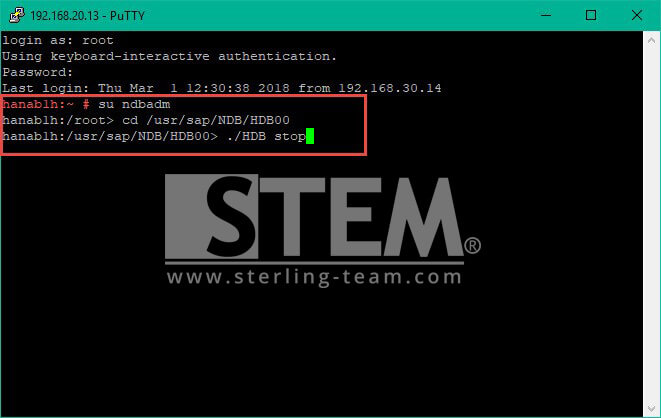
  2. Open the puTTy application, please log in to your HANA system using the root user, and then change the user to <SID> adm
  3. Change the directory that you will access to the HANA installation directory: <HANADIR> / <SID> / HDB00
  4. Type the command below to stop the HANA Database Engine Service and press the enter key afterwards..
    How to restart SAP HANA related services in SuSE Linux Enterprise 11
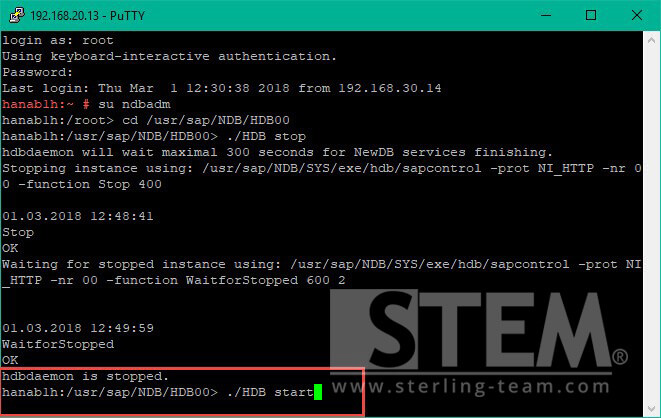
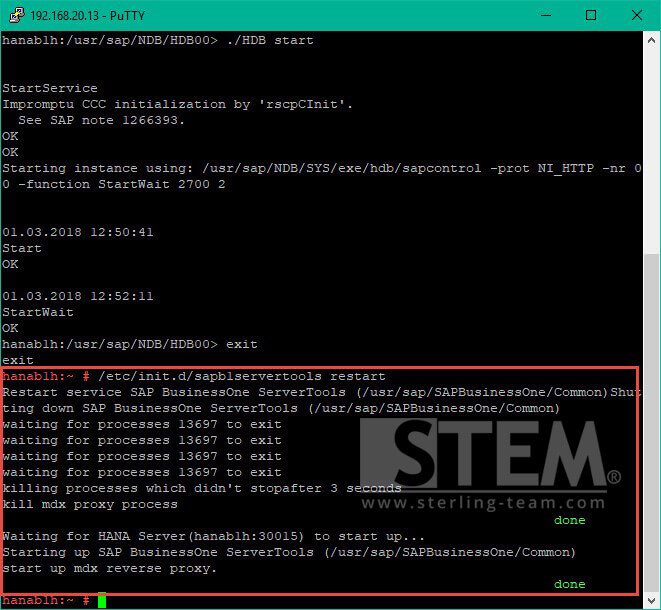
  5. Wait a few moments until the service stops, and then type the command as shown below to restart HANA Database Engine Service
    How to restart SAP HANA related services in SuSE Linux Enterprise 11 SP 4 OS
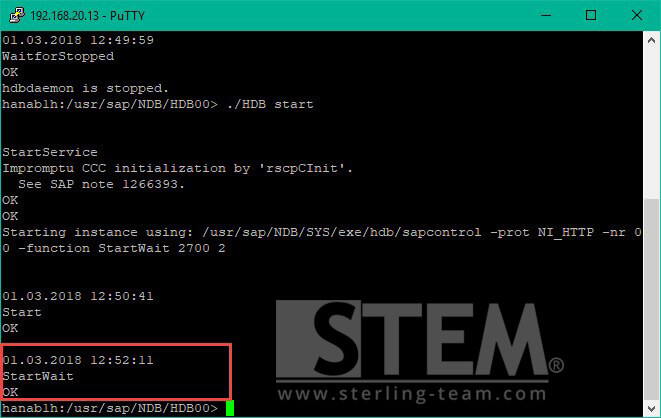
  6. Please wait a few moments until the service starts to run fully.
    How to restart SAP HANA related services in SuSE Linux Enterprise 11 SP 4 OS
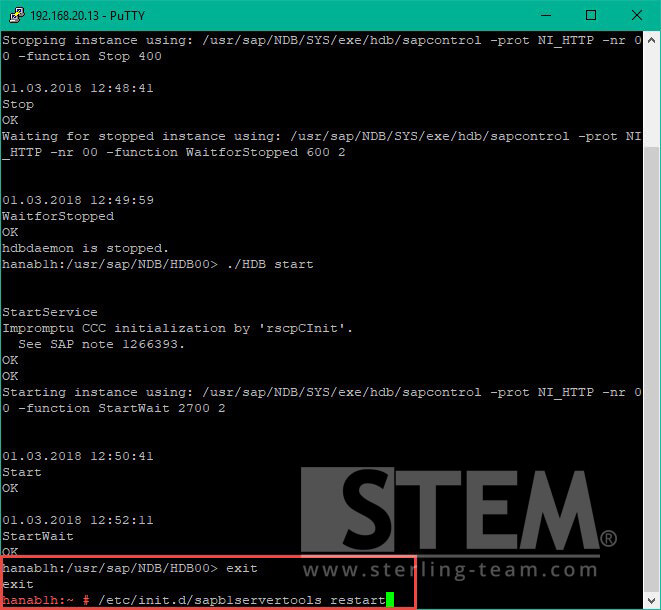
  7. After that, return to the root user, by typing command: exit.
  8. Type the command /etc/init.d/sapb1servertools restart to restart SLD service, Analytics Platform, and others..
    How to restart SAP HANA related services in SuSE Linux Enterprise 11 SP 4 OS
  9. Please wait for a few moments until the service is active and fully restarted.
    How to restart SAP HANA related services in SuSE Linux Enterprise 11 SP 4 OS
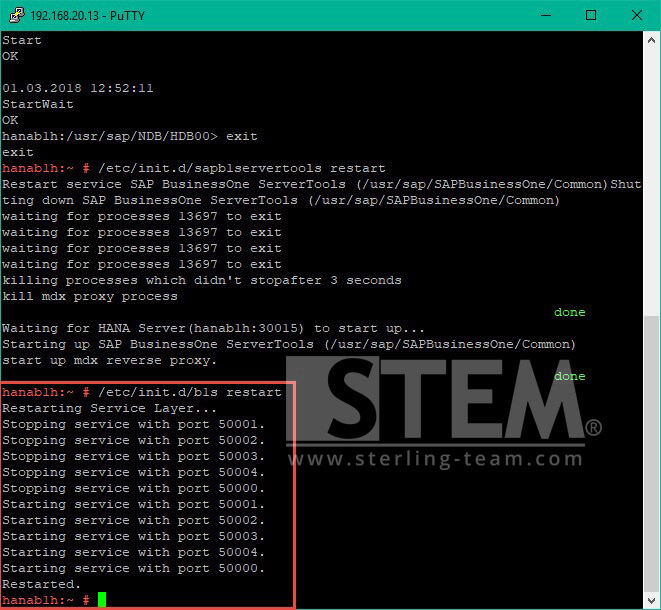
  10. Retype the /etc/init.d/b1s restart command to restart the service layer services.
    How to restart SAP HANA related services in SuSE Linux Enterprise 11 SP 4 OS
If you have already completed these steps, please log back into your SAP Business One, and hopefully your system has returned to normal and any error service problems can be resolved..