Flowchart Breakdown Maintenance

Flowchart Breakdown Maintenance

Flowchart Breakdown maintenance Penjelasan Flowchart :

Production complaints due to engine damage occurred in the production line, production made a notification, then submitted to the engineering team to be followed up
Then the Engineering team will follow up based on that NOTIFICATION, and will convert it into a Order Number. then the engineering team will print a PICK List to request the row material for working on the broken machine, then the spare part team will transfer the stock to the engineering slock.
In this case all work is carried out by the Company's INTERNAL, then after finishing, the user enters the actual time data and closes the Order and submits it to Production to close the notification.
Then what about the work done by outsiders EXTERNAL, the engineering team accompanies the workmanship by the vendor and closes the order and the production closes the notification.
At the end of the month all Orders will be settled for the journaling of machine maintenance costs by the accounting team
How I Approve Adsense Add Site Only 10 Articles

How I Approve Adsense Add Site Only 10 Articles

Hello Guys ....
Never po at all from adsense made me try to do an experiment namely adsense add site cattle that might be difficult. Buying multiple domains and making random articles I finally found the trick to approve add sites with only 10 articles.
  1. Create 10 original articles 500-1000 words of the niche health, business, technology or that does not violate adsense
  2. wait until articles and blogs are really indexed
  3. Use free templates that have navigation menus (about us, contact us, disclaimer, privacy policy, sitemap)
  4. Just add the site right, bro, wait for the notification. there is usually a denial of page templates or boastful content or unreasonable content.
  5. You just change the default blogspot template and add 1-5 articles
ERP implementation in Supply Chain Management

ERP implementation in Supply Chain Management

ERP implementation in Supply Chain Management

Supply chain management (SCM) requires reliable information, communication and technology (ICT) systems. This is driven by the complexity and demands of managers in decision making and controlling SCM. The development of ICT application systems in recent years shows increasingly rapid progress, one of which is the enterprise resource planning (ERP) system.

Integrated enterprise resource planning (ERP) system that is now commonly used by large companies to support the planning and control of supply and demand. Major software vendors such as JDA Software, Microsoft, Oracle, and SAP offer state-of-the-art systems designed to provide real-time data to support better routine decision making, improve transaction processing efficiency, cross-functional integration, and provide increased insight into how a business should be run (Jacobs & Chase, 2011).

The term ERP has different meanings, depending on the user's perspective. From the manager's point of view in a company, the emphasis is on the word "planning"; Managers interpret ERP as a comprehensive software approach to support business planning and control decisions.

On the other hand, for the information technology community, ERP is a term that describes a software system that integrates application programs in finance, manufacturing, logistics, sales and marketing, human resources, and other functions in a company.

This integration is achieved through a shared database by all data processing functions and applications. ERP systems are usually very efficient in handling many transactions that document the company's activities. ERP systems allow for integrated planning within a company.

The company implements ERP to benefit through the efficiency obtained by integrated supply chain planning and process control. In addition, a better response to customer needs is obtained through real-time information provided by the system.

ERP Qualification

There are four aspects of ERP application systems that determine the quality of an ERP system (Jacobs & Chase, 2011).


  1. This application system must be multifunctional within the scope of various company activities with the ability to provide financial information, material procurement activities both in rupiah and volume units, sales in rupiah units and volume of product and service units, and manufacturing or process conversion in units of resources or people .
  2. This application system must be integrated. When a transaction or data representing a business activity is entered by one function, data regarding other related functions is immediately updated. This is able to eliminate the need for reposting data to the system.
  3. This application system must be modular so that it can be combined into a wider system or connected with software from other applications.
  4. This application system must facilitate the planning and control of basic activities, including forecasting, production planning, and inventory management.


An ERP application system can be built with software modules from different vendors, or can be purchased from one vendor. The multivendor approach allows companies to buy "best-in-class" application systems from each module. However this will usually sacrifice the increased costs and greater resources that might be needed to implement and integrate functional modules. On the other hand, a single vendor approach might be easier to implement, but the features and functions of an application system might not be the best application system.

ERP Application System

ERP as a core or backbone in a management information system that integrates all information system applications used in the company. ERP applications include: finance, manufacturing and logistics, sales and marketing, and human resources.

Finance Application System

ERP systems provide a common platform for recording financial data, processing and reconciling data to produce accounting and financial information in the form of general ledgers. From this general ledger, financial statements can then be presented after adjustments have been made in accordance with established accounting policies.

The real benefit of a financial ERP system is the process of recording financial data coming from transaction sources. For example, a transaction regarding an order from a customer, in the financial ERP system this transaction is required for production data and at the same time to update the accounts receivable data when the shipment of goods has been carried out.

Manufacturing and logistics Application Systems

The ERP system that is applied to manufacturing and logistics business processes is the most complex application, because it consists of several modules which include:

  • Sales and operational planning
  • Raw material management
  • Maintenance of factory facilities
  • Quality management
  • Production planning and control

Sales and marketing

The ERP system used for sales and marketing business processes includes customer management activities, such as:

  • Sales order management
  • Forecasting
  • Order management
  • Credit checking
  • Distribution
  • Export control
  • Delivery of goods
  • Transportation management
  • Billing
  • Debating process

Human Resources

ERP applications used to support human resource management activities, which include: payroll, benefit administration, recruitment procedures, personnel development planning, workforce planning, scheduling and shift planning, attendance management, leave, and employee income tax management.

Implement ERP

Many companies have benefited from the implementation of ERP, while on the other hand also found several companies facing problems in implementing ERP.

ERP implementation requires investment and cost is quite expensive, both initial cost and running cost, requires some customized or tailoring to fit the ERP application system with the business processes and supply chain management of the company, requires costs and time for consulting and training activities to ERP implementation.

For companies to succeed in implementing ERP, company management needs to conduct intensive training, starting from the managerial level to the operational level. Cultural changes and ways of working need to be done to adjust and fit into the new ERP-based business process.
APPLYING SUPPLY CHAIN MANAGEMENT IN COMPANIES

APPLYING SUPPLY CHAIN MANAGEMENT IN COMPANIES

Supply Chain Management (SCM) is a way of managing the supply of raw materials, products, information, or services needed by a company from the beginning to the end process that is effective and efficient. The purpose of supply chain management is to control and develop the organization through the principles and processes of management, so that in managing the supply chain process can produce products that are efficient and effective. According to David Jacoby, there are 4 principles that underlie supply chain management, namely:


  • Efficiency. What is done by management must be based on the principle of low cost and minimum time.
  • Reliability What is produced is always consistent, both in terms of product and service quality.
  • Flexibility What management does must be flexibility both in the rules and in the ability to follow the rhythm of customer demand.
  • Innovation. The principle of innovation is needed because competition in the market is not fixed and continues to change.

There are three major components in the SCM concept, namely:


  • Network structure. Determine who are the main members of the supply chain. Usually selected levels from managers to upper levels or top management who are considered to have the right to make decisions in determining the business.
  • Business process. Determine what processes must be associated with each member of the supply chain. It contains a mapping of what processes are carried out from beginning to end, namely:

    Order process: the total time spent from the customer placing an order until the customer receives the item.

    Customer service process: all customer service from before, during and after the sales transaction.

    Distribution process: services ranging from the procurement of products requested by customers to the delivery and receipt of these products by customers.

    Product manufacturing process: to reduce unnecessary or overlapping things or work and speed up the process to be ready to be marketed.

    Supply process: the process of selecting suppliers, selecting products, testing the ability of suppliers, building commitments, agreeing together work agendas and ethical standards, and approving supplier development programs.
  • Management component. Consists of two large groups, namely:

    Structure components: organization, planning and control, information distribution process, and production flow.

    Components of behavior: management principles, owner philosophy, power structure, payroll structure, and corporate culture.


In implementing supply chain management, there are ten processes that must be managed, namely:


  • Information flow and content. Management must be able to manage information from the most upstream party to information from the downstream party or end user of the product.
  • Production. Production flow from upstream, in the form of raw materials, to end users.
  • Customer Relationship Management (CRM). Forming an emotional bond between all parties involved with the hope of all contributing to action for a common goal with the principle of 'win-win solution'.
  • Supplier Relationship Management (SRM). Establish emotional bonds between all suppliers. The concept is almost the same as CRM.
  • Customer Service Management (CSM). Able to provide solutions for all parties involved. Become a spokesperson and ambassador of the company in dealing with parties outside the company.
  • Demand Management (DM). SCM is able to follow the company's processes and activities in increasing the demand for the company's products.
  • Order fulfillment. The process starts from the appearance of orders, processed, until fulfilled orders are the responsibility of SCM. Must meet 6R, right goods, right place, right time, right price, right quality, and right quantity.
  • Accountability SCM is responsible for integrating the manufacturing or product formation process or service from the initial design to the end customers' acceptance.
  • Product development and innovation. SCM is also responsible for the product development process to the market stage.
  • Product return. Product returns due to shipping errors, damaged goods, or refilling processes are also the scope of the SCM proce
Change Purchasing Document System Message Warning to Error

Change Purchasing Document System Message Warning to Error

Change Purchasing Document System Message Warning to Error


  1. Enter into the SPRO T-Code
  2. Select SAP IMG Reference
  3.  Then go to Material Management -> Purchasing -> Environment Data -> Define Attributes of System Messages.
  4. Then search according to the application area and No Messages after that, change the System Message Category from W (warning) to E (Error). The example in the picture below is for Application area 06 and message no. 028 with the information Purchase order date is in the past, so if you want to change the following message that initially warning to an error do as shown below.

Thus this article may be useful😀
DLL function call crashed: ISRT._RegQueryKeyValue Fix

DLL function call crashed: ISRT._RegQueryKeyValue Fix

DLL function call crashed: ISRT._RegQueryKeyValue Fix

When setting up a system, there are issues that we did not anticipate before.
If the issue is already listed in your "bank issue", no problem, we will quickly resolve it.
But if the issue is first experienced, there will be a ritual "tinkering" that must be done, where to get "insight" can be in minutes, hours, days and even weeks.
Sharing a little about SAP Business One.
Sympton:
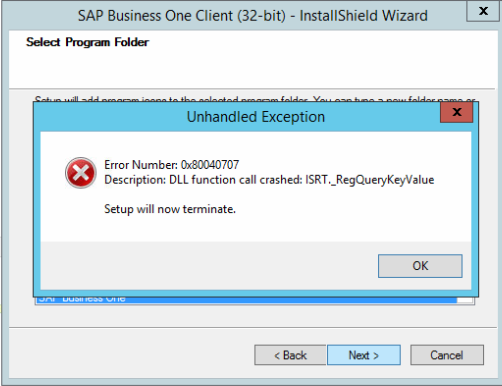
Error saat melakukan instalasi SAP BUsiness One Client, dengan pesan:
Error Number 0x80040707
Description: DLL function call crashed: ISRT._RegQueryKeyValue
Environment:
Operating sistem : Windows Server 2012 R2 Essentials Edition
Database : SQL Server 2012 R2 Standard Edition
SAP Business One version : 9.1 PL 05
SAP B1 Installation Error
Solution:
Enter regedit, click the start button type run and write regedit in the search box.
  1. Perform backup registry first to anticipate things that are not desirable (read: damage to the OS if you delete the wrong key).
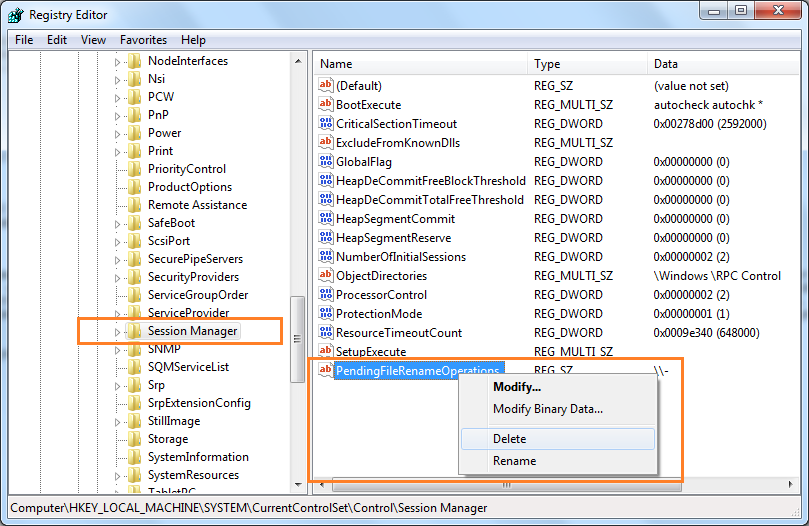
  2. Open the HKEY_LOCAL_MACHINE \ SYSTEM \ CurrentControlSet \ Control \ Session Manager key.
  3. In the pane on the right, look for the PendingFileRenameOperations key, right-click then click Delete.
  4. Close the windows registry and please try the installation process again.
SAP B1 Registry
Note:
For this case you don't need to restart the server.
May be useful
Create Material Stock In SAP SD

Create Material Stock In SAP SD

Create Material Stock In SAP SD

Suppose you have implemented SAP in your company and now you want to place all your shares in the SD system. For this, using T-Code: MB1C with movement type 561, this type of movement indicates that we want to receive goods without supporting documents such as Purchase orders. If through Purchase order can be with movement type 501.


A new window will open then input the create, plant, storage location and movement type dates.


Then choose movement type 561


A new window will open. Enter the material code and the quantity that needs to be created and then click Save.
PO (Purchase Order) With a Different Company Logo

PO (Purchase Order) With a Different Company Logo

How To PO (Purchase Order) With a Different Company Logo.

The case is like this: SAP B1 with 1 (one) database where in it is a holding company with a number of its subsidiaries, wanting that the PO (Purchase Order) document created has a logo in accordance with the company name.
After trying to finally find a solution to these needs, in fact this is a challenge for the writer where initially some friends had said that it was "not possible", but on the other hand & (most importantly of course) is the desire of the writer to help the Procurement Department print the PO that has been made directly from SAP B1.
Of course, if we look at the SAP B1 standard PO form layout it is not in accordance with the internal needs of the company, for that we can make it yourself in accordance with the desired model. In making it, the authors use Crystal Report 2008 which is the SAPA B1.
The following are the manufacturing steps:
  1. Prepare pictures of a number of companies owned.
  2. Save the image with a name according to the code of each company.
  3. Save the image in an image file extension, for example JPG (the file size is small compared to BMP).
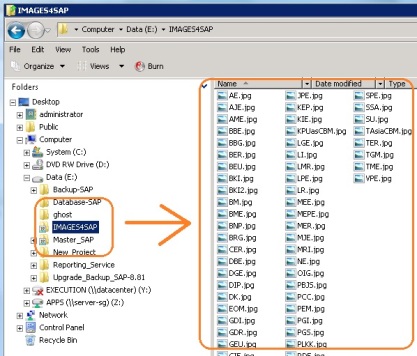
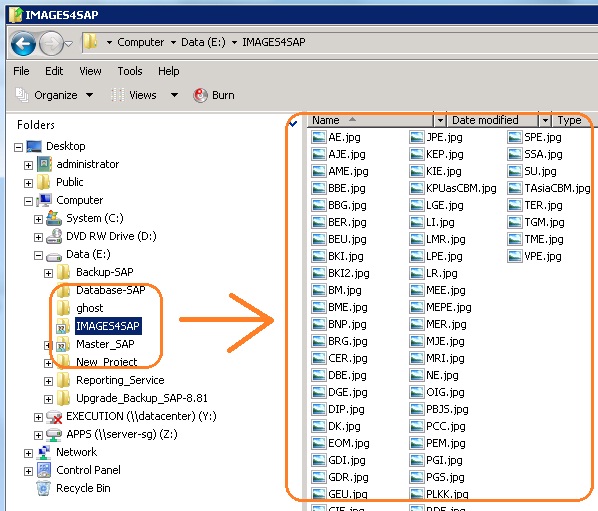
  4. Create a folder on the SAP B1 Server to save the image.
  5. Sharing of image folders created with full authorization.
  6. Make the required PO form layout.
  7. Create a formula in Crystal Report so that the image appears according to the company name.
  8. Mapping network drives in each SAP B1 PC Client, with the letter drive in accordance with the formula made.
To make it easier to understand, the author attaches the following screen shoot images:
SVR
"Folder containing images created on Server-SAP B1"
CLIENT
"Mapping network drive in SAP B1 PC Client"
In the Crystal Report layout, enter an image of the company logo then right-click and select "Format Graphic ..."
LayOut
"PO (Purchase Order) layout form created with Crystal Report"
Select the "Picture" tab then click the "Formula" icon, (note the author's circle).
Formula
Write "Formula" or the formula, remember that the drive letter written must be the same as the network drive mapping created on each SAP B1 PC Client, for example in this case: "V: \" + {SP_MU_PO; 1.U_Company} + ".JPG"
Note: V is a network drive letter mapping, {SP_MU_PO; 1.U_Company} is Store Procedure and .JPG is an image file extension.
Formula
"The formula for a PO (Purchase Order) to be printed in accordance with the company name"
Next is the final appearance of the PO, which will be printed with different company names.
LGETME
So that I can share on this opportunity, hopefully useful!